FrameLayout (중첩 배치 방식)
FrameLayout은 가장 단순한 레이아웃 객체로, 단순히 비어 있는 공간이라고 생각하면 된다.
FrameLayout은 여러 자식 뷰들을 겹쳐서 그리고자 할 때 사용하는 레이아웃이다.
여러 이미지들을 같은 영역에 겹쳐서 표시하고자 할 때 유용하다.
화면에 빈 공간을 할당하고 추후에 그 공간에 비주얼한 디자인을 채워 넣을 수 있다.
| android.widget.FrameLayout | |
| android:foreground | 내용 위에 겹쳐 그릴 표시물 자원. |
| android:foregroundGravity | 포그라운드 표시물의 정렬 방식. |
| android:measureAllChildren | 레이아웃의 크기를 모든 자식을 고려해서 결정할 것인지, 아니면 Visible로 설정된 자식들만 고려할 것인지의 여부. |
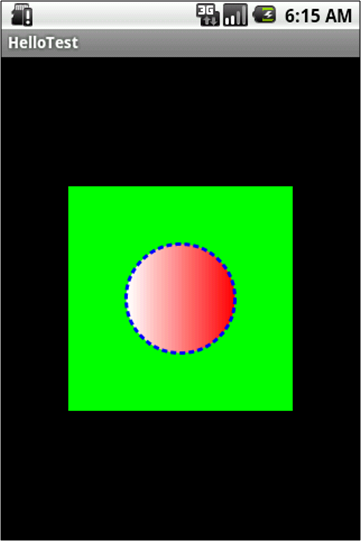
FrameLayout 예제 #1
< /res/layout/main.xml >
<?xml version="1.0" encoding="utf-8"?>
<FrameLayout xmlns:android=http://schemas.android.com/apk/res/android
    android:layout_width="wrap_content"
    android:layout_height="wrap_content"
    android:layout_gravity="center">

    <ImageView
        android:layout_width="wrap_content"
        android:layout_height="wrap_content"
        android:src="@drawable/green_rect"
        android:minHeight="200px"
        android:minWidth="200px"/>

    <ImageView
        android:layout_width="wrap_content"
        android:layout_height="wrap_content"
        android:src="@drawable/red_oval"
        android:minHeight="100px"
        android:minWidth="100px"
        android:layout_gravity="center"/>

</FrameLayout>
< /res/drawable/green_rect.xml >
<?xml version="1.0" encoding="utf-8"?>
<shape xmlns:android="http://schemas.android.com/apk/res/android"
    android:shape="rectangle">

    <solid
        android:color="#0F0"/>

</shape>
< /res/drawable/red_oval.xml >
<?xml version="1.0" encoding="utf-8"?>
<shape xmlns:android="http://schemas.android.com/apk/res/android"
    android:shape="oval">

    <solid
        android:color="#F00"/>

    <gradient
        android:startColor="#F00"
        android:endColor="#FFF"
        android:angle="180"/>

    <stroke
        android:width="3dp"
        android:color="#00F"
        android:dashWidth="5dp"
        android:dashGap="3dp"/>

</shape>
< RUN >
'Layout' 카테고리의 다른 글
| AbsoluteLayout (절대적 배치 방식) (0) | 2022.10.02 |
|---|---|
| RelativeLayout (상대적 배치 방식) (0) | 2022.10.02 |
| TableLayout (표 배치 방식) (0) | 2022.10.02 |
| LinearLayout (직선형 배치 방식) (0) | 2022.10.02 |
| 레이아웃 (Layout) (2) | 2022.10.02 |


댓글