TableLayout (표 배치 방식)
TableLayout은 자식 뷰들을 열과 행으로 조직화된 표 형태로 배치하고자 할 때 사용된다.
| android.widget.TableLayout.LayoutParams | |
| android:collapseColumns | 숨길 열들의 번호. 열 번호는 “0”부터 시작하고, 쉼표로 분리해서 나열할 수 있다. (예: “0, 1, 3, 5”) 지정된 번호의 열은 처음 화면에 나타날 때 숨겨진 상태로 보이지 않는다. 자바 코드에서 TableLayer 클래스의 setColumnCollapse() 메서드를 사용하면 특정 열을 화면에 표시하거나 숨길 수 있다. |
| android:shrinkColumns | 줄일 수 있는 열들의 번호. 열 번호는 “0”부터 시작하고, 쉼표로 분리해서 나열할 수 있다. (예: “0, 1, 3, 5”) 모든 열을 지정하려면 “*”로 지정해 주면 된다. 지정된 번호의 열은 텍스트를 줄 내림하는 등의 방법으로 차지하는 폭을 최대한 줄인다. 일부 열의 내용이 많아져서 테이블 일부가 화면 밖으로 밀려나갈 가능성이 있다면 이 속성으로 효과를 볼 수 있다. |
| android:stretchColumns | 늘릴 수 있는 열들의 번호. 열 번호는 “0”부터 시작하고, 쉼표로 분리해서 나열할 수 있다. (예: “0, 1, 3, 5”) 모든 열을 지정하려면 “*”로 지정해 주면 된다. 지정된 번호의 열은 해당하는 행에서 남아있는 공간을 없앨 수 있을 만큼 폭이 늘어난다. 구성 중인 레이아웃에서 테이블이 차지하는 영역 폭보다 표시할 내용이 적을 경우 유용하게 사용할 수 있다. |
| android.widget.TableRow.LayoutParams | |
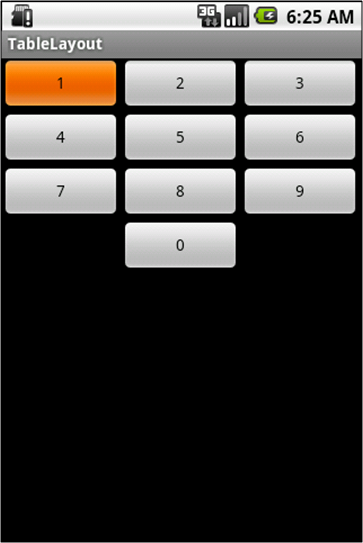
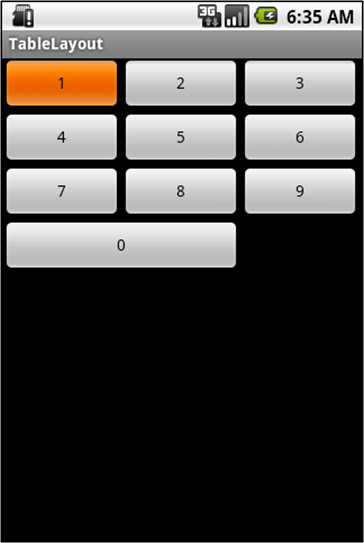
| android:layout_column | 해당 뷰가 표시될 열 번호. (열 번호는 “0”부터 시작한다.) |
| android:layout_span | 해당 뷰가 차지할 열들의 갯수. (“1” 이상의 정수) |
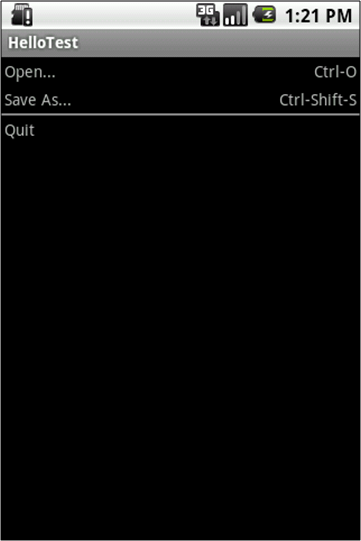
TableLayout 예제 #1
< /res/layout/main.xml >
<?xml version="1.0" encoding="utf-8"?>
<TableLayout xmlns:android="http://schemas.android.com/apk/res/android"
    android:layout_width="fill_parent"
    android:layout_height="fill_parent"
    android:stretchColumns="*">

    <TableRow>
        <TextView
            android:text="Open..."
            android:padding="3dp"/>
        <TextView
            android:text="Ctrl-O"
            android:gravity="right"
            android:padding="3dp"/>
    </TableRow>

    <TableRow>
        <TextView
            android:text="Save As..."
            android:padding="3dp"/>
        <TextView
            android:text="Ctrl-Shift-S"
            android:gravity="right"
            android:padding="3dp"/>
    </TableRow>

    <View
        android:layout_height="2dp"
        android:background="#FF808080"/>

    <TableRow>
        <TextView
            android:text="Quit"
            android:padding="3dp"/>
</TableRow>

</TableLayout>
< RUN >
TableLayout 예제 #2
< /res/layout/main.xml >
<?xml version="1.0" encoding="utf-8"?>
<TableLayout xmlns:android="http://schemas.android.com/apk/res/android"
    android:layout_width="fill_parent"
    android:layout_height="fill_parent"
    android:stretchColumns="*">

    <TableRow>
        <Button android:text="1"/>
        <Button android:text="2"/>
        <Button android:text="3"/>
    </TableRow>

    <TableRow>
        <Button android:text="4"/>
        <Button android:text="5"/>
        <Button android:text="6"/>
    </TableRow>

    <TableRow>
        <Button android:text="7"/>
        <Button android:text="8"/>
        <Button android:text="9"/>
    </TableRow>

    <TableRow>
        <Button
            android:text="0"
            android:layout_column="1"/>
    </TableRow>

</TableLayout>

// android:layout_column => 해당 뷰가 표시될 열 번호
< RUN >
TableLayout 예제 #3
< /res/layout/main.xml >
<?xml version="1.0" encoding="utf-8"?>
<TableLayout xmlns:android="http://schemas.android.com/apk/res/android"
    android:layout_width="fill_parent"
    android:layout_height="fill_parent"
    android:stretchColumns="*">

    <TableRow>
        <Button android:text="1"/>
        <Button android:text="2"/>
        <Button android:text="3"/>
    </TableRow>

    <TableRow>
        <Button android:text="4"/>
        <Button android:text="5"/>
        <Button android:text="6"/>
    </TableRow>

    <TableRow>
        <Button android:text="7"/>
        <Button android:text="8"/>
        <Button android:text="9"/>
    </TableRow>

    <TableRow>
        <Button
            android:text="0"
            android:layout_column="0"
            android:layout_span="2"/>
    </TableRow>

</TableLayout>

// android:layout_column => 해당 뷰가 표시될 열 번호
// android:layout_span    => 해당 뷰가 차지할 열들의 갯수
< RUN >
'Layout' 카테고리의 다른 글
| AbsoluteLayout (절대적 배치 방식) (0) | 2022.10.02 |
|---|---|
| RelativeLayout (상대적 배치 방식) (0) | 2022.10.02 |
| LinearLayout (직선형 배치 방식) (0) | 2022.10.02 |
| FrameLayout (중첩 배치 방식) (0) | 2022.10.02 |
| 레이아웃 (Layout) (2) | 2022.10.02 |


댓글